Question for the segment Guru's

Signed-In Members Don't See This Ad

navycop

Member
Joined
Nov 4, 2010
Messages
2,333
Location
Virginia Beach, VA 23454
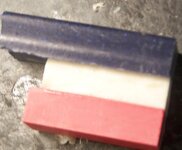
Do the pieces need to be symmetrical? I assume these won't work in their present state. The first two pictures all 3 pieces are the same lenght. I the 3rd I could probally trim the blue one down to the size of the red and white.
 

Attachments

  • segment pieces 003.jpg
    segment pieces 003.jpg
    21.9 KB · Views: 188
  • segment pieces 004.jpg
    segment pieces 004.jpg
    35.6 KB · Views: 131
  • segment pieces 005.jpg
    segment pieces 005.jpg
    34.3 KB · Views: 184
Last edited:
Signed-In Members Don't See This Ad
Is that hole the final one for the tube? If so, then I can't think of a kit that has so much meat that it will include much ( or even any ) of the red or blue.

If the hole is perfectly centred in the white piece and the sides are perfectly parallel, then you might get a thin red and blue stripe.

Nothing to lose now, so just turn it and learn from it. That's what I do:biggrin:
 
Is that hole the final one for the tube? If so, then I can't think of a kit that has so much meat that it will include much ( or even any ) of the red or blue.

If the hole is perfectly centred in the white piece and the sides are perfectly parallel, then you might get a thin red and blue stripe.

Nothing to lose now, so just turn it and learn from it. That's what I do:biggrin:

The white was for a slimline.
 
Ok, so even if you re-drill a bigger hole then the best you could expect is something like the pic below. The circle can't be bigger than the white.
 

Attachments

  • Navy.jpg
    Navy.jpg
    39 KB · Views: 139
Yah, if it is for a slimline pen it will be white when finished. For any other color to work for a slimline pen you would need to cut very close to the hole...very close to the hole and re glue the red and blue back on.
 
Okay. Let me see if I understand this. To make a red, white and blue slimline in the future- I have to glue all 3 together and make them all 3 the size of the white piece? GaryMGg answered my question at the same time I was typing.
PS how did you put that circle on there?
 
Last edited:
Mike, to start with, only the white one needs to be about 1/3rd the final thickness. ( personally I would make it a little less than 1/3 as you will see more of the red and blue in the final item )

Making and drilling a blank like that is actually a LOT more difficult to get perfect than you might think. Just a tiny bit out would stick out like a sore thumb.
I'd be inclined to do the segmenting on the length. I'd cut the colours at an angle to give it some interest. On a slimline, the white would be split over both halves.

Good luck and have fun.

PS; I copied your pic into Paint to add the circle
 

Attachments

  • untitled.jpg
    untitled.jpg
    22 KB · Views: 163
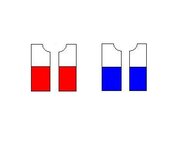
Or you could cut each of the corian pieces as shown buy the blue lines and glue the narrower pieces bake to back on the long edge (see next graphic). Then cut them in half again as shown in the next graphic. Then flip one of each and glue it together as shown in the next graphic. That will give you a blank made up of four long thin segments. You can turn it like that, or do something different. Like cut it into smaller pieces and stagger the layout as you glue them back together. That would give you make something like the Sierra shown last.

Yes, I know, kids, I actually shared something. :eek: I spent some time turning today and couldn't help myself.

 

Attachments

  • corian.jpg
    corian.jpg
    38.8 KB · Views: 129
  • rednblue.JPG
    rednblue.JPG
    4.9 KB · Views: 132
  • rednblue2.JPG
    rednblue2.JPG
    5.9 KB · Views: 128
  • rednblue3.JPG
    rednblue3.JPG
    5.3 KB · Views: 114
  • sierra_redwhiteblue_corian.jpg
    sierra_redwhiteblue_corian.jpg
    10.1 KB · Views: 138
Or you could cut each of the corian pieces as shown buy the blue lines and glue the narrower pieces bake to back on the long edge (see next graphic). Then cut them in half again as shown in the next graphic. Then flip one of each and glue it together as shown in the next graphic. That will give you a blank made up of four long thin segments. You can turn it like that, or do something different. Like cut it into smaller pieces and stagger the layout as you glue them back together. That would give you make something like the Sierra shown last.

Yes, I know, kids, I actually shared something. :eek: I spent some time turning today and couldn't help myself.

Thanks Billy. Really like the Sierra. I guess to avoid this problem in the future I will have to segment like in the last picture.
 
Last edited:
Back
Top Bottom