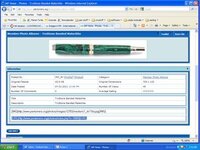
Load your pictures to a picture hosting site like Piccasa etc. or upload them to your members photo album. You copy the URL. in the members album it is under the pictures. Then when you want to include it in your message click on the yellow Icon with the Mountain just at the top of the mesage box. Just like the one above the message reply box and it will put the picture in for you.
the screen shot from the members photos page has the url of the picture highlighted in blue.
this is only one way to do it.
MIke
I should thank who ever posted the picture its not mine. I just borrowed it.