
airborne_r6
Member
- Joined
- Oct 28, 2008
- Messages
- 279
My wife dropped her phone last week and the screen shattered. She is one month away from an upgrade so she was just going to use it until she could upgrade, then pieces of glass started falling into her ear while she was talking.
One of her coworkers said an Apple repair place charges $150 to change the screen. She thought of looking online and found that you can buy the parts and there are videos showing how to do it.
I ended up buying a DIY kit from www.phonedoctors.com. The basic kit to change the screen was $67 or $77 for whatever color she wanted.
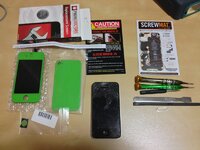
The kit comes with everything you see in the picture except the busted phone. The screwmat is magnetic and shows the location of every screw and the orientation of any other little pieces you have to take out. They include all the tools you need. Everything on the left was in the replacement screen box. Because she wanted to change colors it included a new back plate and home button.
They have a really good video for each model of phone that walks you through how to make the repair you are doing. You also get I think it is 30 days of 24 hour customer support if you have questions.
Following the video and pausing it between steps it took me about 90 minutes to do the whole thing.
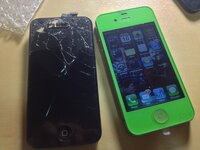
A few things I learned.
1) I used a 2X magnifying visor and I wouldn't recommend trying it without one. (The best price I found on a quality one was Amazon, link below.)
2) I put a white sheet on the floor under where I was working. If you dropped one of these screws on carpet you would never find it.
3) There is a little rubber piece on the iPhone 4S that they don't mention and it fell off the circuit board. It took us forever to figure out where it went, so if you try this PM me and I will explain it, it is important.
4) The screwmat is invaluable. Their videos sound like a commercial for them but you really do need it. The screw are all sorts of different sizes and having the magnetic mat where I could take the screw out and put it in the circle where it came from really helped.
5) I used tweezers to help with the screws and some of the other parts.
6) The metal spatula that is intended to help separate the screen from the housing could have a slightly finer edge. I used a pocket knife to get it started then finished with their tool.
7) You really have to watch out for the little pieces of glass. I got one between the new screen and the desk while reassembling the phone and its a good thing I had left the screen protector on.
8) You have to move the speaker mesh from the old face to the new one. When I took it off the old one all the adhesive to hold it in place stayed on the old face so I used some double sided scrapbooking tape to hold it in place. If you try this PM me and I will give you details.
This saved me a ton of money, I had no idea that you can change the screens on phones yourself. The website I found had repair kits for most touch screen phones and devices.
In case someone is interested here are links:
Phone Doctors - iPhone, Android and Blackberry DIY Kits and Repair
Donegan OptiVISOR Headband Magnifier: Amazon.com: Industrial & Scientific
One of her coworkers said an Apple repair place charges $150 to change the screen. She thought of looking online and found that you can buy the parts and there are videos showing how to do it.
I ended up buying a DIY kit from www.phonedoctors.com. The basic kit to change the screen was $67 or $77 for whatever color she wanted.
The kit comes with everything you see in the picture except the busted phone. The screwmat is magnetic and shows the location of every screw and the orientation of any other little pieces you have to take out. They include all the tools you need. Everything on the left was in the replacement screen box. Because she wanted to change colors it included a new back plate and home button.
They have a really good video for each model of phone that walks you through how to make the repair you are doing. You also get I think it is 30 days of 24 hour customer support if you have questions.
Following the video and pausing it between steps it took me about 90 minutes to do the whole thing.
A few things I learned.
1) I used a 2X magnifying visor and I wouldn't recommend trying it without one. (The best price I found on a quality one was Amazon, link below.)
2) I put a white sheet on the floor under where I was working. If you dropped one of these screws on carpet you would never find it.
3) There is a little rubber piece on the iPhone 4S that they don't mention and it fell off the circuit board. It took us forever to figure out where it went, so if you try this PM me and I will explain it, it is important.
4) The screwmat is invaluable. Their videos sound like a commercial for them but you really do need it. The screw are all sorts of different sizes and having the magnetic mat where I could take the screw out and put it in the circle where it came from really helped.
5) I used tweezers to help with the screws and some of the other parts.
6) The metal spatula that is intended to help separate the screen from the housing could have a slightly finer edge. I used a pocket knife to get it started then finished with their tool.
7) You really have to watch out for the little pieces of glass. I got one between the new screen and the desk while reassembling the phone and its a good thing I had left the screen protector on.
8) You have to move the speaker mesh from the old face to the new one. When I took it off the old one all the adhesive to hold it in place stayed on the old face so I used some double sided scrapbooking tape to hold it in place. If you try this PM me and I will give you details.
This saved me a ton of money, I had no idea that you can change the screens on phones yourself. The website I found had repair kits for most touch screen phones and devices.
In case someone is interested here are links:
Phone Doctors - iPhone, Android and Blackberry DIY Kits and Repair
Donegan OptiVISOR Headband Magnifier: Amazon.com: Industrial & Scientific


 :biggrin: