Computer(s) in your shop

Signed-In Members Don't See This Ad

Smitty37

Passed Away Mar 29, 2018
In Memoriam
Joined
Nov 23, 2009
Messages
12,823
Location
Milford, Delaware 19963
I know that most of you who sell pens use computers in one way or another in the selling aspect of your hobby/business but I wonder if anybody actually has a computer in their shop that they use in the turning aspect.

I have a laptop that I keep in the shop and keep certain information on it - I would think that anyone using a CNC machine must have some sort of computer ... and I think most of the laser engraving/cutting machine must have computer controls. Maybe someone can enlighten me a bit on what kind and how computers are used in the shop environment.
 
Signed-In Members Don't See This Ad
The only time I have one in the shop is when I have my work laptop at home. But then I'm watching email, the forums and my Etsty & Ebay stores. Nothing computer controlled in my shop at this time.
 
I've needed a computer in the shop before to look up instructions on assembly, drill bit sizes, etc. It would be a lot easier than going back in the house an upstairs to my office. Even a tablet you be better than nothing, although the touch aspect would make it a lot more susceptible to getting something on the screen.
 
Smithy, you just read my mind. I have to replace my desk top and thinking of buying a laptop so I can have it in the shop when I am trying to look up something on the you tube and try it right then, instead of going inside and watching it then going back into the shop and trying to remember how to do it. Then, again I am thinking the risk is that you will get the fine sanding dust on it and also if you got any CA glue on you hands then touching the key board or titling the screen with a dirty hand asks for trouble.
I am very much interested to hear more form the pros. on this issue.
 
I don't have a computer in the shop. Mainly because I don't have internet that reaches that far. I do use my smart phone on occasion.
 
I thought about building a low end machine for the shop, mostly to stream music on. Building a low end machine is fairly cheap but I decided against it. I think I'm just going to go with a docking station for an mp3 player. Now if I had my dream laser machine then I'd build a nice rig for the shop ;)

As for dust you can buy filters for your computer fans that will take care of that issue. Computers will take a decent beating. When I did field repairs you would not believe how badly caked the comps I worked on in restaurants were. Some I worked on put the case above the grills in the corner, nothing like standing on a ladder above a hot grill trying to remove a greasy computer case.
 
I have a computer that runs my mill, plotter, and vinyl cutter.

When I am not using one of those tools, I will ofter have it playing music and/or watching for email.

I prefer a desktop for the shop because they tend to be more robust. Also, when the power supply dies from dust inhalation, that is an easy/cheap fix. When that happens to a laptop, it is time to buy a new one.

Same deal applies to the mouse keyboard. I keep my worst of each one hooked up to that computer. If I get some glue or silicone or whatever in it, it is $10 at Walmart for a replacement.
 
I thought about building a low end machine for the shop, mostly to stream music on. Building a low end machine is fairly cheap but I decided against it. I think I'm just going to go with a docking station for an mp3 player. Now if I had my dream laser machine then I'd build a nice rig for the shop ;)

As for dust you can buy filters for your computer fans that will take care of that issue. Computers will take a decent beating. When I did field repairs you would not believe how badly caked the comps I worked on in restaurants were. Some I worked on put the case above the grills in the corner, nothing like standing on a ladder above a hot grill trying to remove a greasy computer case.
Ok, that part of resolved, but what about CA fingers, that may accidently coem in contact with the keys or screen then you'll be screwed.
 
If you don't need much power, you can almost always get an older refurb from TigerDirect for under $100 with keyboard and mouse.
 
I don't have a computer in the shop. Mainly because no room. Also my kitchen with the desktop computer on the counter is just inside the house. I can run in and check drill bit size, assembly directions etc right there.
 
High tech solution for myself....print out or keep instructions that come with kit, keep all in a small binder. If there is a question, open binder, answer is right there. Bit sizes, bushings, mandrel set up, assembly. Good place for hand-written notes. Keep it simple. My question is how many pens do you folks make that you can't recall which drill bit to use.
 
I bought my iPad primarily for the shop. I use it for updating my website, taking inventory, shipping, looking up stuff on the net, and for cutlists when making chambers. Here is a pic of my iPad mounted on the overarm guard of my tablesaw. I use it in this position when cutting acrylic for chambers and have the cutlist on the iPad. When I cut a part, I simply touch the part on the screen and it puts a red dot on it, showing it has been cut.

attachment.php
 
High tech solution for myself....print out or keep instructions that come with kit, keep all in a small binder. If there is a question, open binder, answer is right there. Bit sizes, bushings, mandrel set up, assembly. Good place for hand-written notes. Keep it simple. My question is how many pens do you folks make that you can't recall which drill bit to use.
It's not the drill bits for the kits, it is for other projects. Converting from letter or metric to standard SAE sizes (for me anyway).
 
keep mine out there all of the time. i stream sirius radio while i am working. i also use it to look up finish sizes when turning kits. i go to the library here and bring up the dimensions pdf. also look up kit prices, instruction sheets etc. why keep paper for all of those kits on hand. any way mine is a part of my equipment as far as i am concerned.

by the way, who do we let know about missing dimensions in that chart that we have.
 
Right before moving from CO to CA I had set up a PC with a 37" LCD TV in my shop. Mostly for videos and streaming Pandora while working.

I sold it all when we moved. :(
 
You can check newegg.com, tigerdirect or a local computer store for keyboard covers. Some covers are molded to keys to protect from damage. If you stick your fingers to your keyboard with CA though make sure you take a picture cause that would just be hilarious.
 
Last edited:
Just use the $5 "disposable" keyboards. Micro Center and Fry's both have $5 keyboards all the time. When one gets messed up, toss it and grab another one.
 
High tech solution for myself....print out or keep instructions that come with kit, keep all in a small binder. If there is a question, open binder, answer is right there. Bit sizes, bushings, mandrel set up, assembly. Good place for hand-written notes. Keep it simple. My question is how many pens do you folks make that you can't recall which drill bit to use.

I'll answer that question: 2

Honestly, I don't even try to remember which drill bits go with which kits. When I get ready to drill, I consult my binder-o-instructions to obtain teh drill bit size. It's easy and it protects me from being wrong.

To the OP's issue, I used an old laptop when I had a laser in the shop, but now that the machine is gone, I have no real need for having a computer out there. my smartphone/pda generally is all I need computerwise. Since our shop shares space in our garage, I need only step over to the other side of the room and crank the stereo in my road toy if I need music.
 
I ahve one for music and whatever with 24 gig of mp3s I ripped from my collection. I get tired of the radio and just want music nothing else when I work.
 
I use a laptop computer to control my laser engraver for both engraving and inlay work. I have a spare bedroom set up for my laser and jet mini lathe. In my garage I have a complete wood shop and just purchased a Legacy Artisan CNC machine that will have a laptop computer permanently attached to it out there. I do all my design work inside the house and then just transfer files by networking the computers together using my wireless router. Both laptops are Dell, the inside house machine has a much larger screen which was important to me, the shop machine was $450 so on the low end of Dell machines.
 
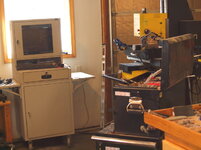
yea...but obviously the main reason is to run the CNC. I got about $1800 in this set up, computer was special custom order to suit my needs, and has major memory upgrades. Also includes cost of protective cabinet, which I can lock and secure, anti theft, being there's software in there worth twice the value of the machine, and I have extra cooling fans and filters to keep dust out. If I didn't have a machine to run off the PC, I don't really see why I'd need a computer in the shop. It could I suppose be good to watch movies, but I have satellite TV in the shop for that. :biggrin:
 

Attachments

  • shopcomputer.jpg
    shopcomputer.jpg
    93.5 KB · Views: 107
I have a very powerful desktop computer in the shop. It runs cad programs, my plotter, a printer, my vinyl sign cutter and will eventually provide instructions for an Enco CNC metal lathe and milling machine.

The computers usually down in the "dust pit" usually last about 5 years before I have to replace the power supply (after 5 years, it's usually time to upgrade, anyway). The only "special" maintenance I do to these computers is to clean the fans and flat screen monitor after each session.

As for the keyboard, I just turn it upside down when it's not in use.
 
I have 2 in my shop each one is dedicated to a cnc mill. I will by next year have 2 more. They are not connected to the internet although I have a wireless usb adapter for them if I need too.
 
I have an old XP desktop that I use to run my CNC. I got a flexible keyboard for it for about $10 that is great for the shop. You can get as much saw dust on it as you want and just blow it off with an air hose.
 
Thanks guys

The answers seem to be about what I expected. Quite a few have them and the use varies from simple lookup to complex CAD and CNC controls.
 
Back
Top Bottom