Geekish question

Signed-In Members Don't See This Ad

TomW

Member
Joined
Mar 23, 2009
Messages
1,436
Location
Allen, Texas
I have a pc that is dedicated as a weather station. Due to well documented hardware problems relating to the usb connection between the data logger and the pc, I have it set up to shut down the station, and reboot every 4 hours. This functionality is built into the weather station software.

It has been ROCK SOLID for 3 years. It reboots every 4 hours, at 8, 12 and 4 am and pm, on the hour.

I came home yesterday and the pc was shut down. I restarted it and it ran fine till 12:00 noon, then shut down (not reboot, just turn off). It does it religiously now every 4 hours.

I'm hoping someone out there understands software initiated reboots, and BIOS and can help me look for the culprit. I DIDN'T do anything, it just quit working.

I've posted this on the weather station forum, but all I get is young kids telling me I should upgrade my hardware, to solve the USB issue. All I want is to get back to auto reboot and I'll be happy

Any help appreciated in advance
Tom
 
Signed-In Members Don't See This Ad
Upgrade your hardware to solve the USB issue.

:wink: :biggrin:


(Sorry, I don't know how to fix your problem)
 
Last edited:
Before replacing the hardware, try replacing the little battery on the motherboard. If you do that, you will need to reset the system bios settings (run the setup option on startup).

Tomas
 
I agree, it sounds like a dead bios battery to me.

You can get them at the jewlery counter at Walmart. Just make sure you put it in with the correct polarity.

DAMHIK...
 
I happened to have a baggie full of Cr 2032s in the frig... no joy.... Also, I just noticed that windows shutdown-> restart causes a full shutdown, so I think it's windows (xp) or bios related. When I replaced the bios battery it defaulted to october 2003....so it's pretty old
Tom
 
If not the battery, not sure.

That said, you might try going into the bios and setting it up to automatically boot at specific times, namely 5-10 minutes after it was "supposed" to have booted. If it has already booted, it will ignore the command. If it is off, it will boot then.

Another option would be to have another machine on your network send a wake on lan command on a regular basis.
 
Another thing to try is opening the command prompt and typing in:

"shutdown -r -t 0"

This should initiate a restart. If this restarts your machine, the restart command in windows was corrupted to cause a shut down. Not too common, but it happens. If this is the case, I can give you instructions on how to fix it.

Or you can just make a .bat file with the above line in it and schedule it to run at your intervals.

 
Another thing to try is opening the command prompt and typing in:

"shutdown -r -t 0"

This should initiate a restart. If this restarts your machine, the restart command in windows was corrupted to cause a shut down. Not too common, but it happens. If this is the case, I can give you instructions on how to fix it.

Or you can just make a .bat file with the above line in it and schedule it to run at your intervals.


Turns it off dead as can be... no restart...

Tom
 
Try booting into safe mode and restarting from there. If it restarts from safe mode, you know it is a software problem.

If it shuts down from safe mode, you know it is a hardware problem.

You get into safe mode by hitting F8 right after the bios screen.
 
Try booting into safe mode and restarting from there. If it restarts from safe mode, you know it is a software problem.

If it shuts down from safe mode, you know it is a hardware problem.

You get into safe mode by hitting F8 right after the bios screen.

Then it's a software problem. Restarted perfectly from safe mode.

Tom
 
Depending on how funky your weather station setup is, the simplist solution is probably to create a new user in windows, which will reset the windows settings, and have that user become the primary account that automatically logs in.

I have seen that fix this problem once in the past. Otherwise, you are pretty much stuck fiddling through the settings for the one that changed and started causing this issue.
 
I was going on the assumption that this was WinXP, but you never say.

Can you give us a bit more info on the system?

Dell Optiplex GX270, Windows XP Pro Version 2002 Service pack 2 Pentium 4 CPU 2.8GHz 1.0 GB ram.

Tom


Check the capacitors on your motherboard.....they can cause all kinds of issues. Check out the following sites:

http://www.badcaps.net/pages.php?vid=2

http://images.google.com/images?um=...aking+capacitor&btnG=Search&aq=f&aqi=&aql=&oq=

Hope this helps....


Barney
 
Check the capacitors on your motherboard.....they can cause all kinds of issues. Check out the following sites:

http://www.badcaps.net/pages.php?vid=2

http://images.google.com/images?um=...aking+capacitor&btnG=Search&aq=f&aqi=&aql=&oq=

Hope this helps....
Barney

Barney,

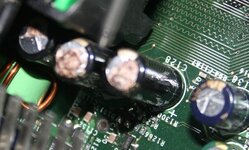
LOOKS LIKE WE HAVE A WINNER! I count about a dozen bad capacitors on this baby...

I want to thank everyone who took the time to try to help me with this problem. You guys are great geeks...:biggrin:

Tom
 

Attachments

  • Bad Caps.jpg
    Bad Caps.jpg
    102.8 KB · Views: 145
Just read an artical a few weeks ago. The Optiplex machine is the one that really started the down fall of dell. They knew the motherboards had problems but still shipped them and they caused all kinds of problems. I have one of them and boy does it run slow. We just have it as a back up and i wont even turn it on. Sad that it would have been a simple fix but they let it go and now alot of people I know would never buy a Dell again. Many are in the IT field. When IT people wont use your product in the computer world you will have a hard time making a living as a large company.
 
Check the capacitors on your motherboard.....they can cause all kinds of issues. Check out the following sites:

http://www.badcaps.net/pages.php?vid=2

http://images.google.com/images?um=1&hl=en&safe=off&rls=com.microsoft%3A*&biw=1162&bih=812&tbm=isch&sa=1&q=gx270+leaking+capacitor&btnG=Search&aq=f&aqi=&aql=&oq=

Hope this helps....
Barney

Barney,

LOOKS LIKE WE HAVE A WINNER! I count about a dozen bad capacitors on this baby...

I want to thank everyone who took the time to try to help me with this problem. You guys are great geeks...:biggrin:

Tom

Glad to help.....

If you're so inclined, you can have the motherboard recapped (check the first url).....might be cheaper than a whole new rig if it was working good for you before the caps went south.....just a thought!

Good luck.....


Barney
 
If you're so inclined, you can have the motherboard recapped

Barney,

Thanks.....but..... I re-used the hard disks and made tie clasps out of the CPUs...probably too late to re-cap...

Tom

Probably for the best overall :) Caps tend to blow when over voltage... so if you have that many bad - there could be other issues under the hood too (power supply, etc).
 
Actually bought 3 of these boxes a few years ago for use in full time service, with little load (e.g. 1 for weather station, one for running a touch screen connected to the home automation system, and one for capturing shots from various cctvs and ftp'ing them to a server). Today I have replaced the CPU fan in all 3, and ditched 2 due to bad caps (did post mortem on #2 after finding bad caps on #1 and found same thing). Still have one running. Good news is I didn't pay much (about probably the value of the OS license).
Tom
 
Back
Top Bottom