Computer help

Signed-In Members Don't See This Ad

jttheclockman

Member
Joined
Feb 22, 2005
Messages
20,301
Location
NJ, USA.
I am having some sort of problem with my computer and was wondering if anyone can identify weather this is a program problem or software problem or something else. This problem will happen after I open a web site. I can write a reply and if I right click to paste something the word paste now becomes part of the screen in blue background and white letters. I can go to my email and read an email and then right click and try to delete it and then the word delete stays on the screen. I have to reboot to get rid of it. I can click out of all running programs and get back to my desktop and the word paste or delete is still there.

I tried to do a screen shot but forgot how to save it and get it posted here. If someone can help with that part I can show you what I mean.

Any suggestions??? Just started happening about a week ago.
 
Last edited:
Signed-In Members Don't See This Ad
JT . to do a screen dump in windows ,simply hit the CTRL button and the Print screen button , then open windows built in "paint" (in accessories ) once it opens to a blank screen press CTRL plus the " V" key , your captured screen will appear in the window, at the top of the screen on the left go to "file" in the drop down box choose save as ,give it a name and save as JPG .
The default is windows BMP and creates huge files (not good for emailing) AT that point you may need to edit or resize in your favourite graphics program , I use ACDC but picasso and many others available ,this all takes a lot less time than my typing lol,
But try running a full virus scan of your computer just in case you have a "nasty " cheers John
Like this :-
 

Attachments

  • control + Print screen.jpg
    control + Print screen.jpg
    54.4 KB · Views: 119
JT . to do a screen dump in windows ,simply hit the CTRL button and the Print screen button , then open windows built in "paint" (in accessories ) once it opens to a blank screen press CTRL plus the " V" key , your captured screen will appear in the window, at the top of the screen on the left go to "file" in the drop down box choose save as ,give it a name and save as JPG .


OK I will give this a try.
 
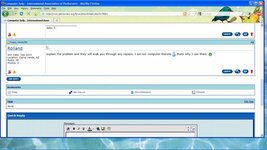
OK here is the screenshot. Notice the word COPY in a blue box next to my name. That is what I am talking about. This can appear anywhere on the screen after I right click to copy something and then paste it in the proper place. Now this will stay on my screen till I reboot. It will only happen once. I can continue on as if normal but this will be embedded in the screen.


screenshot3.png
 
Back
Top Bottom